Get Data from WebAPI using Mock Service
We are using a mock service in the tutorial since in many cases it is possible that an actual Service is still not ready, and the Angular team cannot hold on till the completion of the service, so Angular team will go ahead and create the code. Once the service is ready, just plug in the url in the component and the code should work fine.
Let’s start with creating a mock service and consume it in the code:
Step 1: Install the json-server using commands

Step 2: Save the JsonServer in the application(package.json)

Step 3: Create a Json file(api.json) with predefined entities and it will give you the service url to be consumed in the application

Step 4: Change the api.json file
{
  "City": [
    {
      "id": 1,
      "Name": "Chicago",
      "County": "Cook",
      "Zip": "60660"
    },
    {
      "id": 2,
      "Name": "Chicago",
      "County": "Will",
      "Zip": "60640"
    },
    {
      "id": 3,
      "Name": "Naperville",
      "County": "DuPage",
      "Zip": "60563"
    }
  ]
}
app.component.html
<div class="content" role="main">
  <tr>
    <td>
      <input type="button" value="Get" (click)="GetData()" />
    </td>
    <td>
      <input type="button" value="Send" (click)="PostData()" />
    </td>
    <td>
      <input type="button" value="LoadFromRawJSON" (click)="LoadJSON()" />
    </td>

  </tr>

</div>

<table class="gradienttable">
  <tr>
      <th><p>City</p></th><th><p>County</p></th><th><p>Zip</p></th>
  </tr>

  <tr *ngFor="let c of CModels">
      <td>{{c.Name}}</td>
      <td>{{c.County}}</td>
      <td>{{c.Zip}}</td>
  </tr>

</table>

<router-outlet></router-outlet>
A simple and self explanatory html with input controls calling methods to be used in the component.
app.component.ts
import { Component } from '@angular/core';
import { HttpClient } from '@angular/common/http'
import { CityModel } from './AppModel'
import { Observable } from 'rxjs';
@Component({
  selector: 'app-root',
  templateUrl: './app.component.html',
  styleUrls: ['./app.component.css']
})
export class AppComponent {
  title = 'CommunicationWithAPI';
  cityModel: CityModel = new CityModel();
  CModels: Array<CityModel> = new Array<CityModel>();
  constructor(public httpc: HttpClient){
  }
  GetData(){
    this.httpc.get("http://localhost:3000/City")
              .subscribe(r => this.Success(r), r => this.Error(r));
  }
  PostData(){
    var dto: any = {};
    dto.Name = 'Gurnee';
    dto.County = 'Gurnee';
    dto.Zip=60999;
    this.httpc.post("http://localhost:3000/City", dto)
              .subscribe(r => this.SuccessfromPost(r), r => this.Error(r));
  }
  SuccessfromPost(response)
  {
    this.GetData();
  }
  Error(response){
    console.debug(response);
  }
  Success(response){
    this.CModels = response;
  }
}
In the component we are importing HTTPClient object that will be used to get/post data from the service.
GetData()
We get the service url (“http://localhost:3000/City“) when we install the api.json file on the json-server. In Angular, we use HTTP client to get data from the url and use subscribe method to trigger success/error events as per the data recieved.
    this.httpc.get("http://localhost:3000/City")
              .subscribe(r => this.Success(r), r => this.Error(r));
In the Success events we are just binding the response to the list objects so that it will be shown as the grid in the UI.
Success(response){
    this.CModels = response;
  }
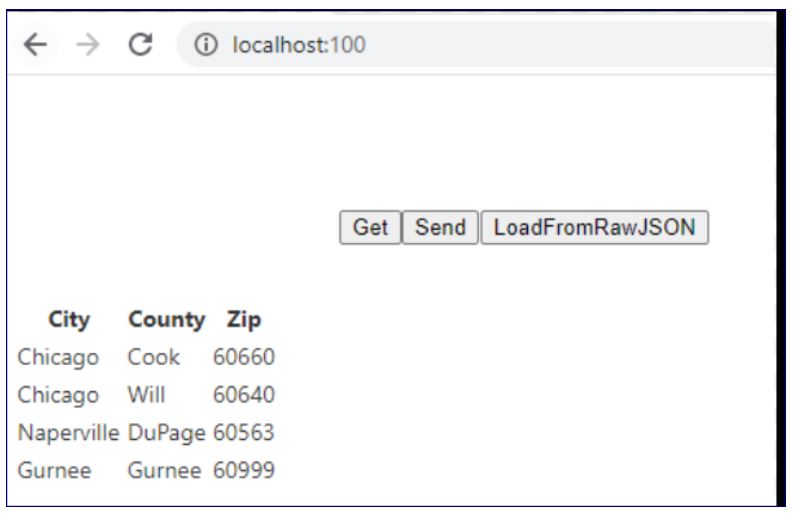
Click on Get button from the UI. The grid with City/County/Zip will be populated with the data received from the JSON.
PostData()
To send the data from client to the service, we use post method of the httpclient object. In our example, we are sending a simple dto object to the service which will just save the data received and then display the saved data accordingly.
PostData(){
    var dto: any = {};
    dto.Name = 'Gurnee';
    dto.County = 'Gurnee';
    dto.Zip=60999;
    this.httpc.post("http://localhost:3000/City", dto)
              .subscribe(r => this.SuccessfromPost(r), r => this.Error(r));
  }
Click on Send button, the current data is transferred from dto to the service and then displayed in the grid according to the code.
 Tech Tutorials