Component interaction in Parent-Child-Parent
Components arranged in hierarchical fashion can transmit messages to each other in Angular by using Input, Output and EventEmitters or @ViewChild. In the below example we will achieve Component Interaction in Parent child and vice versa using @Input and @ViewChild
We would like to achieve the following,
Parent sending messages to Child:
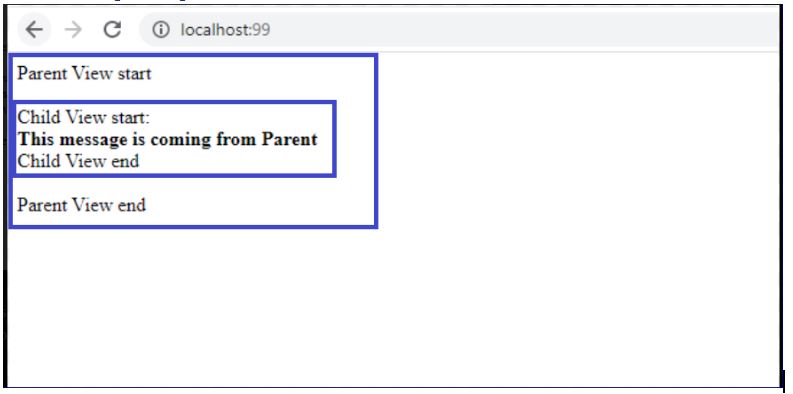
Child can send messages to Parent too:

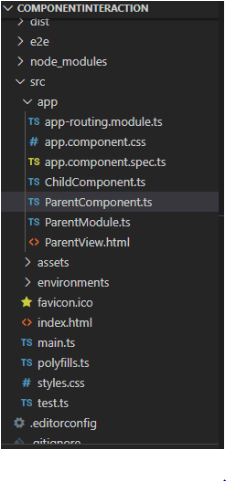
Angular Project structure is as follows:
ParentComponent.ts
import { Component } from '@angular/core';

@Component({
  selector: 'app-root',
  templateUrl: './ParentView.html',
  styleUrls: ['./app.component.css']
})
export class ParentComponent {
  title = 'ComponentInteraction';
  ParentMessage = "This message is coming from Parent"

  constructor() {

  }

}
So, a simple ParentComponent code above, note the ParentMessage variable setting a value above.
ParentView.html
Parent View start
<child-panel [ChildMessage]="ParentMessage"></child-panel>
Parent View end
Now a <child-panel> in parentView is use to refer the Child Component selector and the [ChildMessage] is bound to the ChildComponent which will read the ParentMessage from the ParentComponent
ParentModule.ts
import { BrowserModule } from '@angular/platform-browser';
import { NgModule } from '@angular/core';
import { FormsModule } from '@angular/forms';
import { AppRoutingModule } from './app-routing.module';
import { ParentComponent } from './ParentComponent';
import { ChildComponent } from './ChildComponent';

@NgModule({
  declarations: [
    ParentComponent, ChildComponent
  ],
  imports: [
    BrowserModule,
    FormsModule,
    AppRoutingModule
  ],
  providers: [],
  bootstrap: [ParentComponent]
})
export class ParentModule { }
A simple Module typescript above(No need to name it to ParentModule.ts though) will contain references to ParentComponent and ChildComponent as well.
ChildComponent.ts
import { Component, Input } from '@angular/core';
@Component({
  selector: 'child-panel',
  template: '<br/><br/>Child View start: <br><b> {{ChildMessage}} </b><br/> Child View end<br/><br/>',
})
export class ChildComponent {

  @Input() ChildMessage: string;

}
Writing a simple ChildComponent and defining ChildMessage as Input which receives ParentMessage as described in the ParentComponent above. The selector is defined as child-panel, referenced in ParentView.html
UI:

Now the code for Child to send message to parent:
ChildComponent.ts
import { Component, Input } from '@angular/core';
@Component({
  selector: 'child-panel',
  template: '<br/><br/>Child View start: <br><b> {{ChildMessage}} </b><br/>  Child View end<br/><br/>',
})
export class ChildComponent {
  @Input() ChildMessage: string;
  childsendingmessage: string = 'Message from Child';
Just create a variable childsendingmessage and set the value.
ParentComponent.ts
import { Component, ViewChild, AfterViewInit} from '@angular/core';
import { ChildComponent } from './ChildComponent'
@Component({
  selector: 'app-root',
  templateUrl: './ParentView.html',
  styleUrls: ['./app.component.css']
})
export class ParentComponent {
  title = 'ComponentInteraction';
  ParentMessage = "This message is coming from Parent"

  messageFromChild : string;
  @ViewChild(ChildComponent) childComponent;

  ngAfterViewInit() {
    this.messageFromChild = this.childComponent.childsendingmessage;
  }
  constructor() {

  }
}
@ViewChild is used to declare the ChildComponent part and it will be initialized only after the view is loaded. Hence we will get the messages coming from child in the ngAfterViewInit() method only. The childComponent has childSendingmessage part.
ParentView.html
Parent View start
<child-panel [ChildMessage]="ParentMessage"></child-panel>

<b> From Child - {{ messageFromChild }}  </b>
<br/>
Parent View end.
As we have seen in the ParentComponent, the messageFromChild was being set by child component’s childsendingmessage, we are using the same in the expression in the ParentView.html {{ messageFromChild }} and the value will be set accordingly.
UI:

Hence, we can successfully implement the Parent-Child-Parent component interaction.
 Tech Tutorials