Writing jQuery code in Angular
No customer-facing UI application is complete without writing our own custom JavaScript code. This is because there is always a need to do certain operations that requires jQuery/JavaScript intervention.
Angular also supports programmers to plug-in Javascript or Jquery but with a twist. The following steps will explain how to achieve this:
Step1: Install jQuery and save it in package.json config. The following command would achieve this:

Step2: Now expose this jQuery installation to Typescript by installing types and save in package.json

Step 3: Verify the installation in package.json
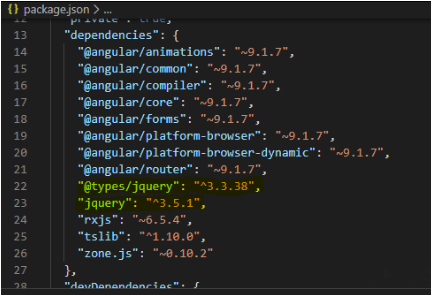
Step4: Write a simple control in view and call a jquery method (CallJQueryMethod())
app.component.html
<a id='hrefIllinois' myAttr='0'
(click) = "CallJQueryMethod()"
[routerLink]="['/Illinois/View']"> Illinois </a>
Step5: Import Jquery in the app.component.ts and write the CallJqueryMethod()
app.component.ts
import { Component, Injector } from '@angular/core';
import { City, States, BaseClass } from 'src/Helpers/DependencyInjection';
import * as $ from "jquery"

@Component({
  selector: 'app-root',
  templateUrl: './app.component.html',
  styleUrls: ['./app.component.css']
})
export class AppComponent {
  title = 'This is the title set from component and displayed in the view';

  CallJQueryMethod(){
   $('#hrefIllinois').attr('myAttr', '1');
   alert('The value of my attribute is: ' + $('#hrefIllinois').attr('myAttr'))
  }
Step 6: Perform ng serve –port 120
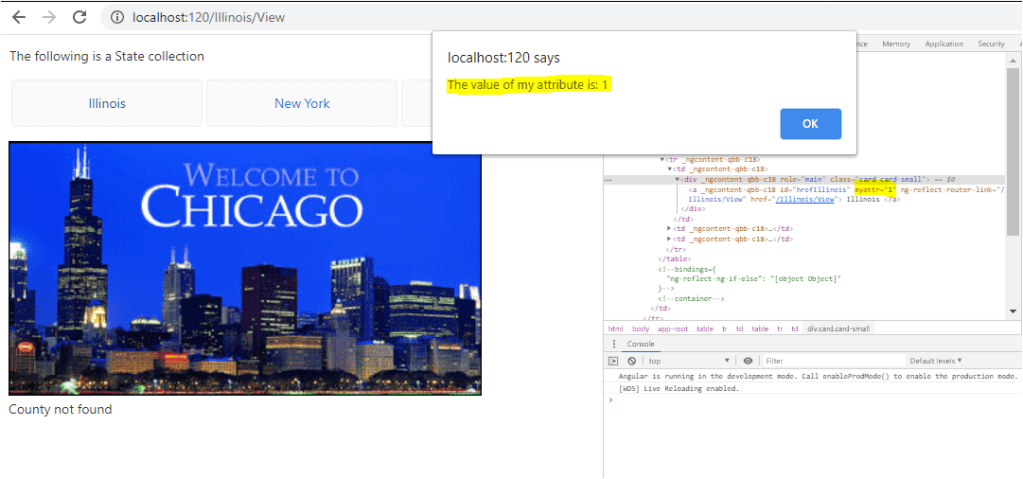
Since we raised an alert in the jquery method and changed the attribute value. The following behaviour can be seen on the UI. Notice the highlighted color to see the changes applied by Jquery through code
 Tech Tutorials