Load Data from Raw JSON
We can load data from a raw json file by referring to the url and subscribing to the return events.
Consider a raw json file:
SampleJson.json
[
    {"name" : "Angular", "code" : "NG"},
    {"name" : "Azure", "code" : "AZ"},
    {"name" : "C#", "code" : "C#"},
    {"name" : "Javascript", "code" : "JS"},
    {"name" : "jQuery", "code" : "$"},
    {"name" : "SQL", "code" : "SQL"}
]
App.component.html
<div class="content" role="main">
  <tr>

    <td>
      <input type="button" value="LoadFromRawJSON" (click)="LoadJSON()" />
    </td>

  </tr>

</div>
Just create a button click event to call the LoadJSON() method that will load from the raw json file (SampleJson.json)
App.component.ts
import { Component } from '@angular/core';
import { HttpClient } from '@angular/common/http'
import { CityModel } from './AppModel'
import { Observable } from 'rxjs';

@Component({
  selector: 'app-root',
  templateUrl: './app.component.html',
  styleUrls: ['./app.component.css']
})
export class AppComponent {
  title = 'CommunicationWithAPI';

  cityModel: CityModel = new CityModel();
  CModels: Array<CityModel> = new Array<CityModel>();

  constructor(public httpc: HttpClient){ }

  private _jsonURL = 'assets/SampleJson.json';


  }

  LoadJSON(){
    this.httpc.get(this._jsonURL)
              .subscribe(r => this.LoadJSONSuccess(r), r => this.Error(r));
  }

  Error(response){
    console.debug(response);
  }

  LoadJSONSuccess(response)
  {
    console.debug(response);
  }
}
In the app.component.ts write the LoadJson method and use the HTTPClient to load the raw json and subscribe to the success (LoadJSONSuccess) and error events (Error) accordingly.
  LoadJSON(){
    this.httpc.get(this._jsonURL)
              .subscribe(r => this.LoadJSONSuccess(r), r => this.Error(r));
  }
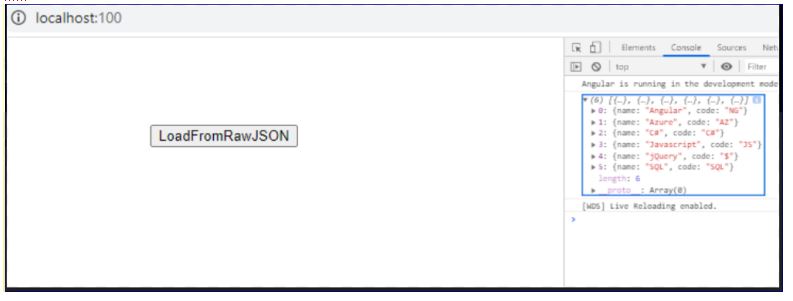
Once a response from the Json file is received, the corresponding events based on success/error can be triggered. In our example, we are just showing the output on the chrome browser console.
App.module.ts
import { BrowserModule } from '@angular/platform-browser';
import { NgModule } from '@angular/core';

import { AppRoutingModule } from './app-routing.module';
import { AppComponent } from './app.component';
import { HttpClientModule } from '@angular/common/http'

@NgModule({
  declarations: [
    AppComponent
  ],
  imports: [
    BrowserModule,
    AppRoutingModule,
    HttpClientModule
  ],
  providers: [],
  bootstrap: [AppComponent]
})
export class AppModule { }
We used HTTPClient in the component and module will contain the imports of HTTPClientModulehtml we created button click event:
imports: [
    BrowserModule,
    AppRoutingModule,
    HttpClientModule
  ],
ng serve –port 120
 Tech Tutorials