Models and For Loop
Models are an integral part of an application implementing SoC (Separation of Concern). They are independent of the views and responsible for enforcing validations, rules, logic, data transfer and manages the data.
Implementing SOC is very important since they are built independent of each other hence unit testable. In all the architectures like MVC, MVP, MVVM, MVW, etc. the common layer is always the Model.
Angular also supports SOC, hence we can create a model layer and define the class properties, rules, validation, data transfer, etc.
In the below tutorial, we will create a model and use it to display a grid in the view. I assume, the reader has basic knowledge of HTML.
Created a new project ‘MyBookStore’ and structured it as below:

BookStoreModel.ts
export class BookStoreModel {
    BookID: string = "";
    BookName: string = "";
    BookAuthor: string = "";
    BookPrice: number = 0;
}
The class BookStoreModel has few properties and this class can be exported to consuming modules.
BookStoreComponent.ts
import { Component } from '@angular/core';
import { BookStoreModel } from './BookStoreModel'

@Component({
  selector: 'app-root',
  templateUrl: './BookStoreView.html',
  styleUrls: ['./app.component.css']
})
export class BookStoreComponent {
  title = 'MyBookStore';

  BookModel: BookStoreModel = new BookStoreModel();
  LstBookModel: Array<BookStoreModel> = new Array<BookStoreModel>();

  Submit()
  {
    this.LstBookModel.push(this.BookModel);
    this.BookModel = new BookStoreModel();
  }
}
So in the BookStoreComponent, we are importing the BookStoreModel and created an object ‘BookModel’ along with list of model objects (LstBookModel) used to collect the data of type BookStoreModel.
BookStoreModule.ts
import { BrowserModule } from '@angular/platform-browser';
import { NgModule } from '@angular/core';
import { FormsModule, ReactiveFormsModule } from '@angular/forms';
import { BookStoreComponent } from './BookStoreComponent';
import { CommonModule } from '@angular/common';


@NgModule({
  declarations: [
    BookStoreComponent
  ],
  imports: [
    BrowserModule,
    FormsModule,
    ReactiveFormsModule,
    CommonModule
  ],
  providers: [],
  bootstrap: [BookStoreComponent]
})
export class BookStoreModule { }
BookStoreView.html
<table style="border: blue; border: 1px;">
    <tr>
      <td>
        Book ID
      </td>
      <td>
        <input [(ngModel)]="BookModel.BookID" type="text" />
      </td>
    </tr>

    <tr>
      <td>
        Book Name
      </td>
      <td>
        <input [(ngModel)]="BookModel.BookName" type="text" />
      </td>
    </tr>

    <tr>
      <td>
        Book Author
      </td>
      <td>
        <input [(ngModel)]="BookModel.BookAuthor" type="text" />
      </td>
    </tr>

    <tr>
      <td>
        Book Price
      </td>
      <td>
        <input [(ngModel)]="BookModel.BookPrice" type="text" />
      </td>
    </tr>

    <tr>
      <td>

          <input (click)="Submit()" type="button" value="Submit" /> <br>

      </td>
    </tr>
  </table>


  <table class="gradienttable">
    <tr>
      <td>Book ID</td>
      <td>Book Name</td>
      <td>Book Author</td>
      <td>Book Price</td>
    </tr>

    <tr *ngFor="let book of LstBookModel">
        <td>{{book.BookID}}</td>
        <td>{{book.BookName}}</td>
        <td>{{book.BookAuthor}}</td>
        <td>{{book.BookPrice}}</td>
    </tr>

</table>
In the view, we are binding the input controls to the Model object’s properties.
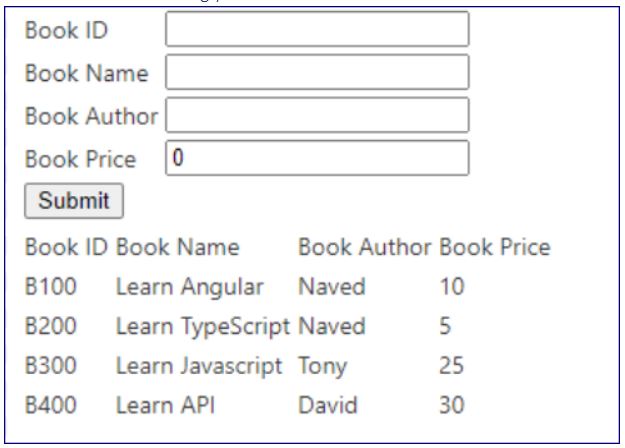
Notice in the table class ‘gradienttable’, I want to structure the in grid view fashion, hence I created few table columns in the first row and then corresponding rows will be filled using for loop.
For Loop
We can loop through the list of BookStoreModel object LstBookModel
*ngFor=”let book of LstBookModel”
Then using the expression we can refer and fill with the model properties:
<td>{{book.BookID}}</td>
<td>{{book.BookName}}</td>
<td>{{book.BookAuthor}}</td>
<td>{{book.BookPrice}}</td>
This example is simply to make you understand the working of For Loop. With this logic you can also create nested for loop. In our tutorials on a reusable grid controls, we will use select button in the grid and route it to display the selected row.
Ng Serve –port
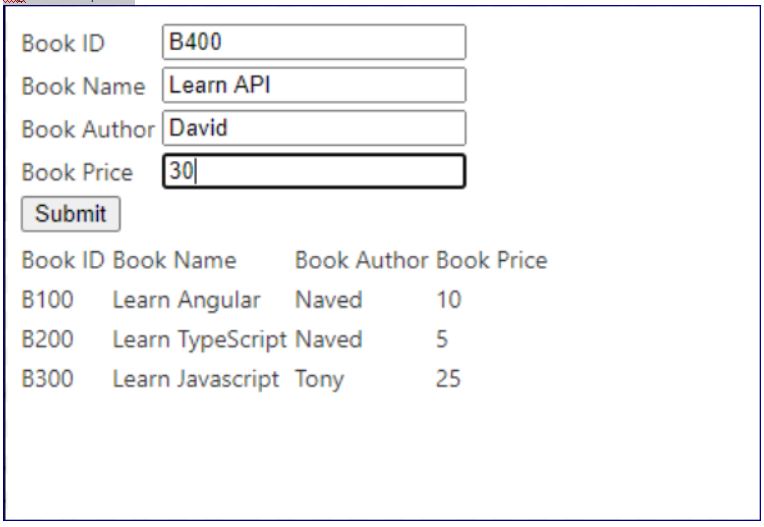
Click on Submit button (since the input controls and the grid rows are bind to model object it will reflect the data accordingly
 Tech Tutorials