Angular Model validations
In the previous chapter, we learned how to create a model class in Angular. In this tutorial we will extend the model class to include validations.
In our MyBookStore application, our requirement is to prevent submit if user does not provide the Book Name and Book price should be between 10 to 999.
Let’s write the validation code in the BookStoreModel.ts
BookStoreModel.ts
import
{
    FormGroup,
    FormControl,
    Validators,
    FormBuilder
} from '@angular/forms'

export class BookStoreModel {
    BookID: string = "";
    BookName: string = "";
    BookAuthor: string = "";
    BookPrice: number = 0;
    formGroup : FormGroup = null;

    constructor()
    {
        var builder = new FormBuilder();
        this.formGroup= builder.group({});

        this.formGroup.addControl("BookNameValidator", new FormControl('', Validators.required));

        var validationCollection = [];
        validationCollection.push(Validators.required);
        validationCollection.push(Validators.pattern("^[0-9]$"))

        this.formGroup.addControl("BookPriceValidator",
                                    new FormControl('', Validators.compose(validationCollection)));

    }
}
In the model, import the FormGroup, FontControl, Validators and FormBuilder from angular/forms assembly.
We will write the validation logic and group it together in the FormGroup using the FormBuilder.
BookStoreView.html
<form [formGroup]="BookModel.formGroup">
  <table style="border: blue; border: 1px;">
    <tr>
      <td>
        Book ID
      </td>
      <td>
        <input [ngModelOptions]="{standalone: true}" [(ngModel)]="BookModel.BookID" type="text" />
      </td>
    </tr>
    <tr>
      <td>
        Book Name
      </td>
      <td>
        <input formControlName="BookNameValidator" [(ngModel)]="BookModel.BookName" type="text" />
      </td>
    </tr>
    <tr>
      <td>
        Book Author
      </td>
      <td>
        <input [ngModelOptions]="{standalone: true}" [(ngModel)]="BookModel.BookAuthor" type="text" />
      </td>
    </tr>
    <tr>
      <td>
        Book Price
      </td>
      <td>
        <input formControlName="BookPriceValidator" [(ngModel)]="BookModel.BookPrice" type="text" />
      </td>
    </tr>
    <tr>
      <td>

          <input (click)="Submit()" [disabled]="!(BookModel.formGroup.valid)"
                type="button" value="Submit" /> <br>
      </td>
    </tr>
  </table>

  </form>

  <table class="gradienttable">
    <tr>
      <td>Book ID</td>
      <td>Book Name</td>
      <td>Book Author</td>
      <td>Book Price</td>
    </tr>
    <tr *ngFor="let book of LstBookModel">
        <td>{{book.BookID}}</td>
        <td>{{book.BookName}}</td>
        <td>{{book.BookAuthor}}</td>
        <td>{{book.BookPrice}}</td>
    </tr>
</table>
<table>
  <tr>
    <td>
      Property Binding:The book author is: <input type="text" [value]="BookModel.BookAuthor">
    </td>
  </tr>
</table>
So the input controls to be validated in grouped inside the form using [formGroup] and since we want to apply validations in the Book Name field, we will provide the formControlName from the Model.
formControlName=”BookNameValidator”
Since we are grouping the entire form in the formGroup, other controls which are not to be validated are asked to stand out of the validation by specifying:
[ngModelOptions]=”{standalone: true}”
If we provide ngModelOptions, the controls will not participate in the formGroup validations.
The formGroup consists of several events which informs the control if the validation is
- Valid
- Dirty
- Invalid
- Pristine
- Touched/Untouched.
In our example, if the validation fails, we will disable the submit button using formGroup.valid
<input (click)="Submit()" [disabled]="!(BookModel.formGroup.valid)"
                type="button" value="Submit" /> <br>
ng serve –port 100
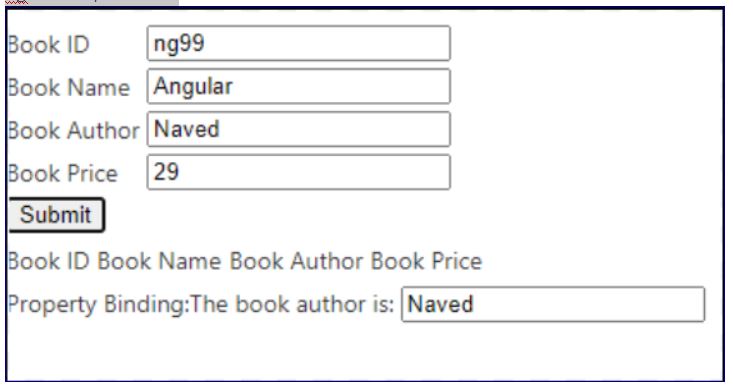
So the submit button will be enabled only if
- Book Name is entered
- Book price is between 10 to 999
Now note the BookStoreComponent.ts and BookStoreModule.ts code is as below:
BookStoreComponent.ts
import { Component } from '@angular/core';
import { BookStoreModel } from './BookStoreModel'

@Component({
  selector: 'app-root',
  templateUrl: './BookStoreView.html',
  styleUrls: ['./app.component.css']
})
export class BookStoreComponent {
  title = 'MyBookStore';

  BookModel: BookStoreModel = new BookStoreModel();
  LstBookModel: Array<BookStoreModel> = new Array<BookStoreModel>();

  Submit()
  {
    this.LstBookModel.push(this.BookModel);
    this.BookModel = new BookStoreModel();
  }
}
BookStoreModule.ts
import { BrowserModule } from '@angular/platform-browser';
import { NgModule } from '@angular/core';
import { FormsModule, ReactiveFormsModule } from '@angular/forms';
import { BookStoreComponent } from './BookStoreComponent';
import { CommonModule } from '@angular/common';


@NgModule({
  declarations: [
    BookStoreComponent
  ],
  imports: [
    BrowserModule,
    FormsModule,
    ReactiveFormsModule,
    CommonModule
  ],
  providers: [],
  bootstrap: [BookStoreComponent]
})
export class BookStoreModule { }
In this way you can apply a range of validations in Angular.
 Tech Tutorials